CPR West Covina Logo

The entry product

Booking Calendar for CPR Training Companies

A booking widget you embed in your own website. Students pick a course, pick a date, and pay without leaving your domain. The confirmation, the notification, and the calendar event happen on their own.

  • 01Embeds into the site you already have
  • 02You keep your own Square or Stripe
  • 03Calendar views by instructor, course, and day
4.9 from 300+ Google and Yelp reviews on our own CPR businessBuilt by operators, not a software company

Assembly

How the booking calendar works

Six steps, start to finish. Steps 5 and 6 are the ones you currently do by hand.

6 steps

  1. Embed the widget

    One snippet on your site. Students never leave your domain.

  2. Student picks a course

    BLS, ACLS, PALS, Heartsaver, each with its own format and seats.

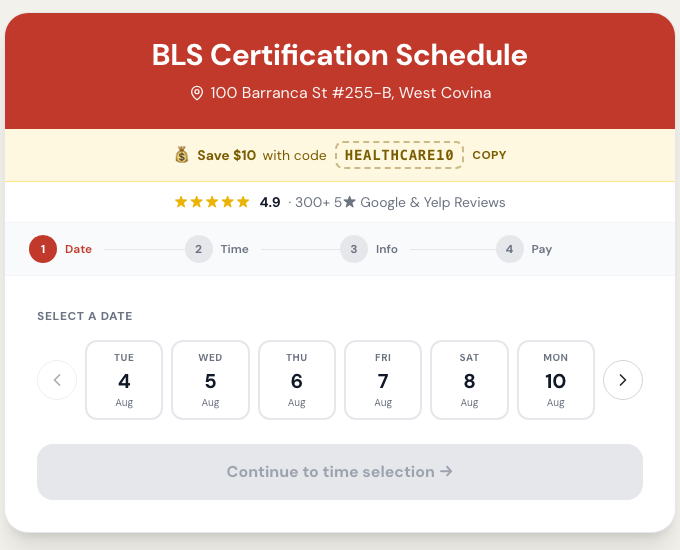
  3. Student picks a date

    Only real open sessions show, with live remaining seat counts.

  4. Student pays

    Your own Square or Stripe. The money lands in your account.

  5. Everyone gets told

    Confirmation to the student, booking alert to you, instantly.

  6. Calendar writes itself

    The class event appears on the instructor's Google Calendar.

From our own account

The live class booking widget on our own website
The live booking widget on our own site.

Contents

What you get

In the box

  • 01Embeddable booking widget for your site
  • 02Course, date, and seat selection flow
  • 03Live seat counts per session
  • 04Student confirmation email
  • 05Owner booking notification
  • 06Google Calendar sync for instructors
  • 07Calendar views by instructor, course, and day
  • 08Works alongside the ops dashboard for leads, revenue, and students

Price

What it costs

Starting at

$500 to build, $29/month

Founder pricingFirst 10 clients · Prices rise Jan 2027

What’s included

  • 011 location
  • 02Booking confirmations
  • 03Added to calendar of choice

Anything beyond the starting build gets a real quote after a 15-minute call.

Prices go up in January 2027. Book before then and your rate is locked for as long as you stay a client.

Common assembly error

The Friday afternoon spreadsheet

Without it

Most CPR companies take bookings in three places at once: a phone that rings during class, an email inbox nobody watches on weekends, and a third-party scheduling page on someone else's domain. The class roster lives in a spreadsheet that one person updates. On Friday afternoon that person is teaching.

The result is predictable. Two students get sold the last seat. An instructor drives to a class of one because a cancellation never made it to the sheet. A student who booked at 11pm on Sunday gets a reply Tuesday and by then has booked with somebody else.

None of that is a discipline problem. It is a missing system. When booking, payment, notification, and the calendar are four separate manual acts, they will fall out of sync, because a human has to remember to do all four while holding a manikin.

What is the best booking software for CPR training companies?

The honest test is whether the tool knows what a certification is. A generic scheduler treats a BLS class like a haircut: a time slot with a name attached. It has no idea the class has a seat cap tied to manikin count, that the same course sells in three formats, that the student walks out with a card that expires in two years, or that the instructor is the real inventory. Look for a system that models course, session, seat, instructor, payment, and expiry as separate things. That is the difference between a calendar that takes bookings and a system that runs the business. We built ours for our own CPR company first, which is why those objects exist in it.

How do I let students book CPR classes online without leaving my website?

You embed the booking widget directly in a page on your own domain instead of linking out to a scheduler. Two things improve immediately. Conversion goes up because students never hit an unfamiliar branded page and pause to wonder if they are still buying from you. And ad tracking stops breaking, because the gclid that came in with the click is still on the page when the booking happens, so the sale can be attributed to the keyword that paid for it. Redirecting to a third-party domain drops that thread. If you run Google Ads at all, on-domain booking is worth more than the conversion lift alone.

Can I get calendar views by instructor, by course, and by day?

Yes, and you need all three because they answer different questions. The instructor view answers staffing: who is teaching Saturday, who is double-booked, who has a free morning you could sell into. The course view answers demand: BLS renewal is filling five days out while Heartsaver has empty seats every week, so move the schedule. The day view is what you actually work from on class day, with rosters and seat counts. One combined month grid hides all three. Views are filters on the same booking data, so nothing is duplicated and nothing drifts.

Where do I see the whole week, not just one class?

That is the ops dashboard, which is a separate piece that reads the same booking data. The calendar answers class-day questions: who is enrolled Saturday, which instructor, how many seats are left. It does not answer whether the week is on pace, because that needs leads, revenue, and unpaid students sitting next to the schedule. We kept them apart deliberately so the booking calendar stays the thing you embed and the dashboard stays the thing you open in the morning. If you want the wider view, see how the ops dashboard works on its own page, linked below. Our own business runs around 137 bookings a month across both.

Do I have to change payment processors to use a booking widget?

No, and you should be suspicious of anything that says otherwise. You keep your existing Square or Stripe account and payments settle directly to you. Nothing routes through us and we never hold your revenue. The widget hands off to your processor at checkout, then matches the completed payment back to the booking so the confirmation, the seat, and the calendar event all reflect money that actually arrived. Platforms that insist on becoming the merchant of record are solving their problem, not yours.

Troubleshooting

Booking calendar questions, answered

How long does it take to get the booking calendar live?
The widget is the fast part. Embed the snippet, connect your calendar and your payment processor, load your course list and session schedule, and you are taking bookings. The longer work is importing past students and payment history, which matters for the renewals engine but is not required to start booking.
Does it work on my existing website?
Yes. It embeds into the site you already have. If your site is on a platform that makes embedding painful, that usually comes up on the first call and we tell you before you commit to anything.
Can students book more than one seat at a time?
Yes. A manager booking four staff into the same session is one of the most common flows, so seat count is part of the booking, not a workaround where they check out four times.
What happens when a class fills up?
The session stops showing as available and the seat count reflects real remaining capacity, so you cannot oversell a class. Seat caps are set per session, because a class with six manikins is not the same as a class with twelve.
Do instructors see the bookings?
Yes. Class events sync to Google Calendar or the calendar you already use, so instructors see class day where they already look instead of in a system they have to be trained on.
Can I take phone bookings too?
Yes. Phone bookings get entered against the same sessions, so the roster, seat count, and revenue stay accurate. That also matters for ad tracking, because phone sales are the ones most often missing from your ad account.
Is this only for CPR companies?
It is built for CPR and certification training companies because that is the business we run. The same mechanics fit swim schools, driving schools, dental CE providers, and trade certification programs, any business that sells classes and issues cards that expire.
What does it cost?
The booking calendar starts at $500 to build, then $49 a month. That covers one location, booking confirmations, and events written to the calendar of your choice. More locations, more course types, and importing existing student data are what move the number above that.

Need a hand

See the booking calendar running

Get on a call and we will walk you through the widget on a real site, show you where your current setup drops bookings, and quote what you actually need.

We work with CPR and certification training companies nationwide